How a 17-Vehicle Fleet Stopped Scrolling WhatsApp to Track Fuel
Charu Construction runs 17 trucks and 50+ trips a day. Every trip gets reported to a WhatsApp group. Every fuel request used to require the owner to scroll back through hundreds of those messages to verify it. Querygen Flows now reads the dispatch messages and fuel receipt photos, extracts structured data from both, and cross-references them in a live dashboard.
The Scrolling Problem
Picture this. You own a fleet of 17 trucks. Your drivers send dispatch messages to a WhatsApp group every time they start a trip: route name, vehicle number, load weight. They do this fifty times a day. Then a driver pulls into a fuel station and sends a refuelling request. Before you approve it, you need to verify: did this vehicle actually make those trips? How many kilometers since the last fill-up? Does the fuel consumption make sense?
To answer those questions, you scroll. You scroll through hundreds of messages in the fleet group, looking for dispatch entries that mention that specific vehicle number. You cross-reference dates. You check load weights. You do mental math on fuel efficiency. This takes 30 to 45 minutes per request, and you get multiple requests every day.
That was the daily reality for the owner of Charu Construction. The data was all there in WhatsApp. Every trip, every load, every fuel receipt. But it was buried in a river of messages that never stopped flowing. Finding what you need meant reading everything.
What the Messages Look Like
The drivers at Charu Construction send dispatch updates to a WhatsApp group in a simple format. Route, vehicle number, and load weight. Nothing fancy. No forms. No apps. Just a quick text message before they start driving.
The problem was never the format. The problem was volume. Fifty messages a day, mixed in with fuel photos, idle chatter, and coordination messages. The signal was there. Extracting it took all day.
50.DYKE TO HALD
2899 DC : 04
WT: 45.01
51.DYKE TO HALD
DC 5182: 06
WT: 42.27
52.DYKE TO HALD
BG 7450, 03
WT: 29.99
Querygen Flows reads each message the moment it arrives and extracts the trip number, route, vehicle registration, count, and weight. It parses every field and writes it to a Google Sheet in under three seconds. The driver types the same message they always typed. Nothing changes on their end. The same WhatsApp data automation pattern that works across eight different industries.
Fuel Receipt Triangulation
Dispatch messages tell you which vehicles made which trips. Fuel receipt photos tell you how much diesel went into each vehicle. Separately, both are useful. Together, they become a verification system.
When a driver sends a fuel receipt photo to the WhatsApp group, the Flow extracts the amount in liters, the cost in rupees, the fuel station name, and the vehicle number. It then cross-references this against the trip log for that vehicle. How many trips has this truck made since its last fill-up? What was the total load carried? Does the fuel consumption per trip fall within the expected range?
The owner no longer scrolls through messages to verify these things. The dashboard shows the answer in seconds.
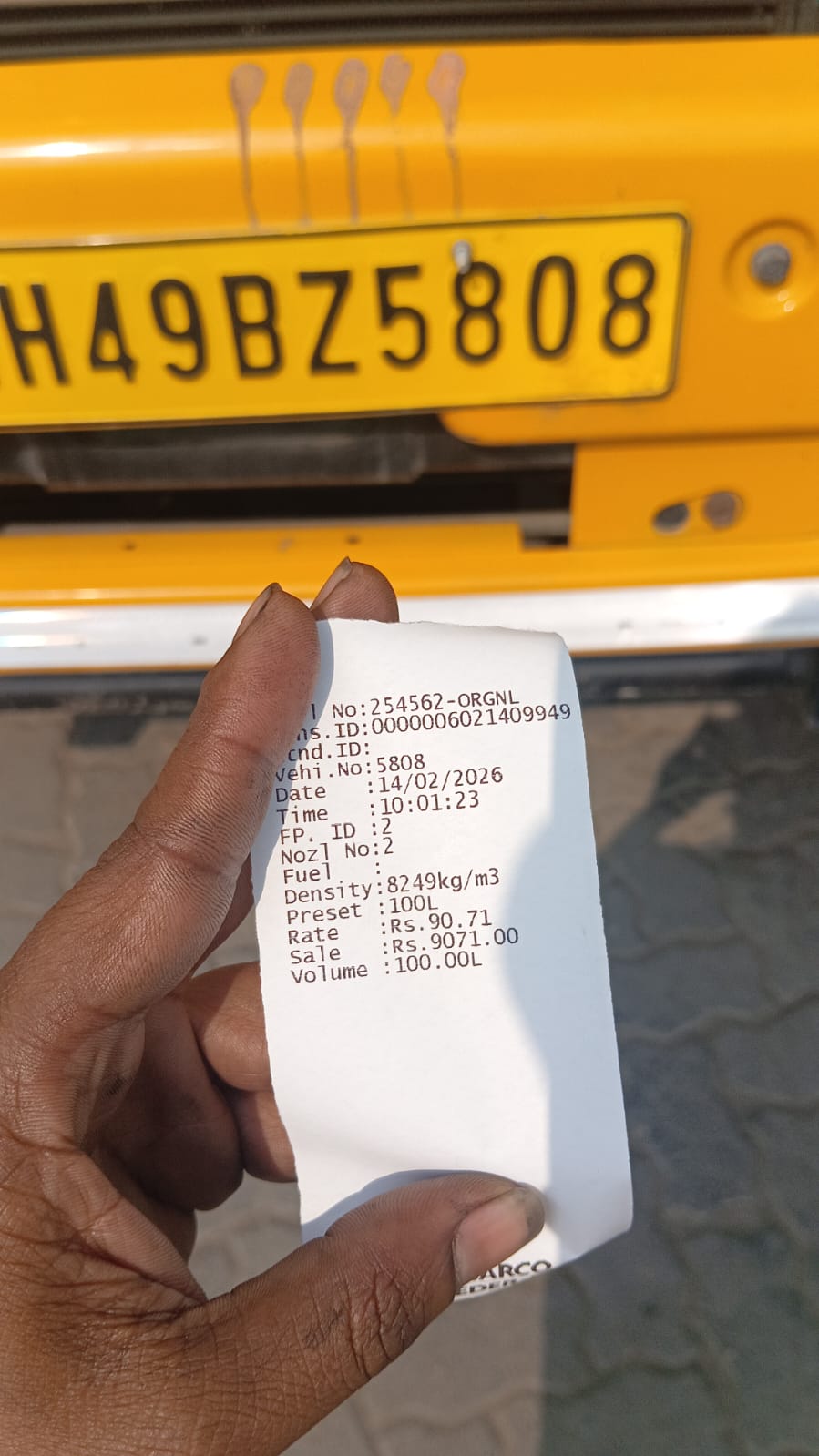
Vehicle 5808 — 100L diesel at ₹90.71/L — ₹9,071 total. The driver photographs the receipt against the truck's plate. Querygen extracts both data points automatically.
The Dashboard That Replaced Scrolling
The extracted data feeds into a Google Sheet that powers a mobile dashboard. The owner pulls out his phone between site visits and sees the full fleet picture on one screen. Which trucks are running. How much they carried. What the fuel bill looks like today. He used to get this picture once a week, compiled by hand. Now it updates itself.
Daily Summary
53
17 vehicles
1,971.2t
1,408.1L
₹1,27,725
Recent Trips
That is one day. 53 trips across 17 trucks. Nearly two thousand tonnes of material moved. Over 1,400 liters of diesel burned. Every number pulled from WhatsApp messages the drivers were already sending.
The Trip Log: Structured From Chaos
Behind the dashboard sits a Google Sheet with every trip as a structured row. Date, route, vehicle number, load weight. One WhatsApp message in, one clean row out.
This is the same data that used to be trapped in WhatsApp messages. Same routes. Same vehicle numbers. Same weights. The only difference is that now it lives in a structured format that can be searched, filtered, and analyzed. Want to see all trips for vehicle 2899 DC this week? One filter. Want total load carried on the Dyke to Hald route? One formula.
The Numbers
From first WhatsApp connection to live dashboard: seven days. That included configuring the extraction Flow, building the Google Sheet structure, and wiring up the mobile view. After day seven, the owner stopped scrolling and started approving.
53
Daily Trips
Tracked automatically
17
Vehicles
Full trip history
1,971t
Daily Load
Weight tracked
₹1.27L
Fuel Cost
Per day, verified
Fuel verification dropped from 30-45 minutes to under 60 seconds. Open dashboard. Check vehicle 2899 DC's trip count. Compare against fuel consumed. Approve or flag. Three taps instead of thirty minutes of scrolling. Multiply that by four or five fuel requests a day, and the owner got his evenings back.
Who This Works For
Charu runs 17 trucks. But fleets of 5 or 50 face the same problem: drivers text a WhatsApp group, and that operational data vanishes into the scroll.
Construction and mining fleets
Trucks moving material between sites. Trip logs, load weights, and fuel consumption tracked from dispatch messages.
Logistics and delivery companies
Delivery vehicles reporting pickups and drop-offs. Route tracking and fuel efficiency from daily WhatsApp updates.
Bus and passenger transport
Operators running multiple vehicles across routes. Trip counts, passenger loads, and fuel costs from driver messages.
Agricultural transport
Vehicles moving produce from farms to markets. Load weights, route data, and fuel records from field team WhatsApp groups.
If your drivers already text a WhatsApp group when they start a trip, you have the raw data. You just don't have the extraction layer yet.
“The drivers didn't download a new app. They kept texting the same group. The data just stopped dying in the chat.”
Your fleet data is already in WhatsApp. Let it out.
Querygen Flows reads dispatch messages and fuel receipt photos from your WhatsApp group, extracts structured data, and powers a live fleet dashboard. Charu Construction went from manual scrolling to automated verification in seven days.
From the journal
Keep reading
How Vishnu Enterprises Tracks Inventory From Challan Photos
Vishnu Enterprises uses Querygen Flows to turn challan photos from staff into live inventory records, customer history, and stock movement reports.
Read articleWhatsAppHow The Wrapping Store Moves WhatsApp Buyers Faster
The Wrapping Store uses Querygen Autopilot to answer product-code, price, size, and catalog questions on WhatsApp so a customization-heavy sales process can move faster.
Read articleWhatsAppHow Happy Eaters Answers Parenting Questions in WhatsApp Groups
Happy Eaters uses Querygen Autopilot to answer parenting questions inside WhatsApp groups, build trust in public, and turn helpful community moments into a growth flywheel.
Read article